CCFinder7m
Publisher Description
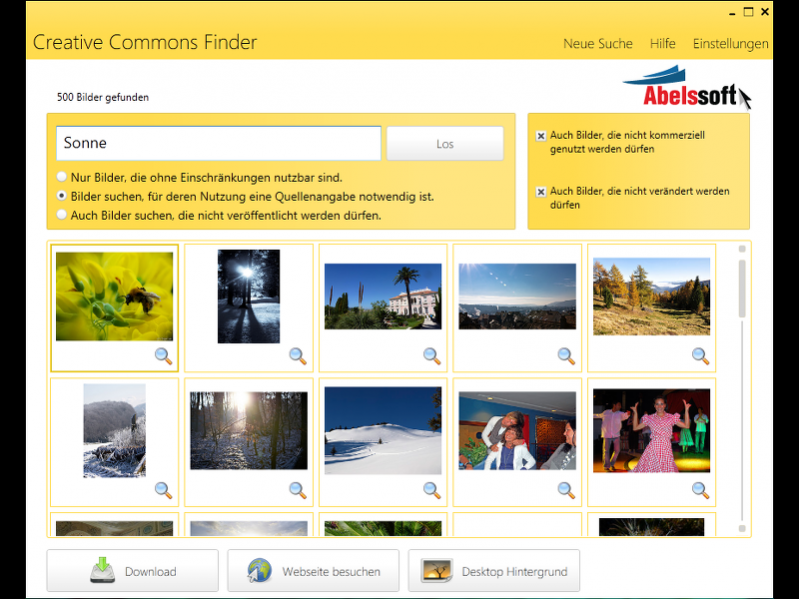
CCFinder is shorthand for Creative Commons Finder. CCFinder helps you to easily find pictures which were publicized under the Creative Commons License. CCFinder enables you to search based on specific usage criteria and shows you what you may do with each picture.
This means that you can re-publicize most of the pictures found, for example on your website. Additionally,
The main features of CCFinder:
* With CCFinder you can easily find download pictures with a creative commons license from Flickr based on your search terms.
* CCFinder let's you define how you want to use the picture (commercially, if you want to change it, etc.).
* It shows you an overview or a detail view.
* With CCFinder you can directly set pictures to be your desktop picture.
* CCFinder is very easy to use and already looks like a Windows 8 application.
The free version of CCFinder has no limitations regarding the amount of search criteria you will use or the display of pictures found or any other restrictions.
After each download of 20 pictures the user will be asked to spread the program inside social networks.
The CCFinder Pro version allows additionally to put color filter on the picture to change it's look.
The Pro version from version V1.01 on also contains a way to save a 'document of proof' PDF containing the image, a time stamp, it's web-address and the associated creative-commons-rights.
About CCFinder
This Search/Lookup Tools program is available in Arabic, Chinese, German, English, French, Italian, Polish, Swedish, Spanish, Czech. It was last updated on 29 September, 2026. CCFinder is compatible with the following operating systems: Windows.
The company that develops CCFinder is Abelssoft. The latest version released by its developer is 7m. This version was rated by 11 users of our site and has an average rating of 2.1.
The download we have available for CCFinder has a file size of 5.2 MB. Just click the green Download button above to start the downloading process. The program is listed on our website since 2017-06-18 and was downloaded 337 times. We have already checked if the download link is safe, however for your own protection we recommend that you scan the downloaded software with your antivirus. Your antivirus may detect the CCFinder as malware if the download link is broken.
How to install CCFinder on your Windows device:
- Click on the Download button on our website. This will start the download from the website of the developer.
- Once the CCFinder is downloaded click on it to start the setup process (assuming you are on a desktop computer).
- When the installation is finished you should be able to see and run the program.
Program Details
General
System requirements
Download information
Pricing
Version History
version 7m
posted on 2017-06-18
Jetzt mit aktualisierten Bilddatenbanken fr noch bessere Ergebnisse.
version 1.0
posted on 2012-02-21
None. It is the first release.
